Support · Connect by country

Connecting your markets

How each kind of connection works, step by step, and where to get a key in your country. Everything on the ticker comes through one of three connections.

Crypto exchanges

Why no connection is needed

Crypto exchanges publish their prices openly. Deck includes five exchanges, and you pick them. There is no account to create and nothing to paste.

What “connecting more” means

Connecting more exchanges doesn’t involve a key either. It means ticking more exchanges in your connections:

  1. Open Settings → Connections → Crypto · exchanges.
  2. Five places are included. Tick the exchanges you want in them.
  3. For more than five, add five more exchanges ($10 a year), up to ten in all.
  4. Crypto components in your decks can then use those exchanges. The ticker shows them once the deck is on a line.

In a component, the exchange list follows the settlement currency you choose, so a pair that doesn’t exist can’t be picked.
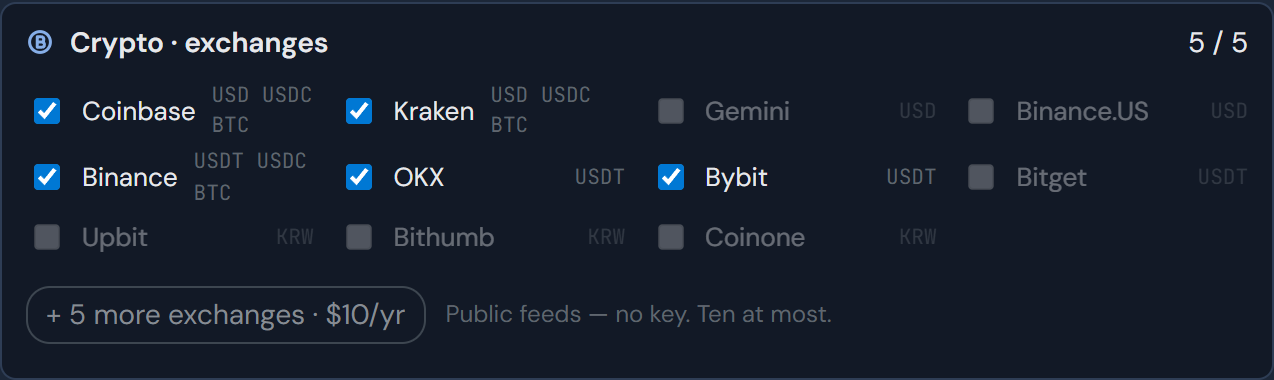
Crypto exchanges in Settings, Connections: twelve exchanges with checkboxes, five ticked, and five more for $10 a year
STUDIO · SETTINGS → CONNECTIONS · CRYPTO

Connecting your broker

Stocks, and the indexes that come with your account, reach the ticker through a key that your broker issues to you. You do this once per computer.

1. Apply for API access at your broker

Most investors already use their broker’s trading program or app (HTS or MTS). The API key is usually not issued inside that program. It is applied for separately, on the broker’s website or its developer site. Where and how is listed under By country. You need an account at that broker first; some brokers also issue keys for a mock-trading account.

2. Get what your broker issues

Most brokers give you two values: a key (often called App Key or API Key) and a secret (App Secret or Secret Key). Some show the secret only once, so copy it before you close the page. A few brokers, such as Interactive Brokers and Futu/moomoo, issue no key: you sign in to their own program on your computer, and ScoutDex connects to that program.

Treat a key like a password. ScoutDex only reads prices and never sends an order.

3. Open the connection window in the app

In the ScoutDex app, open Settings → Connections, choose Add a broker, and pick your broker. If you are in the studio in your browser, Open in the ScoutDex app takes you there.

The app then asks for what that broker uses: a key and a secret, or a sign-in to the broker’s own program.
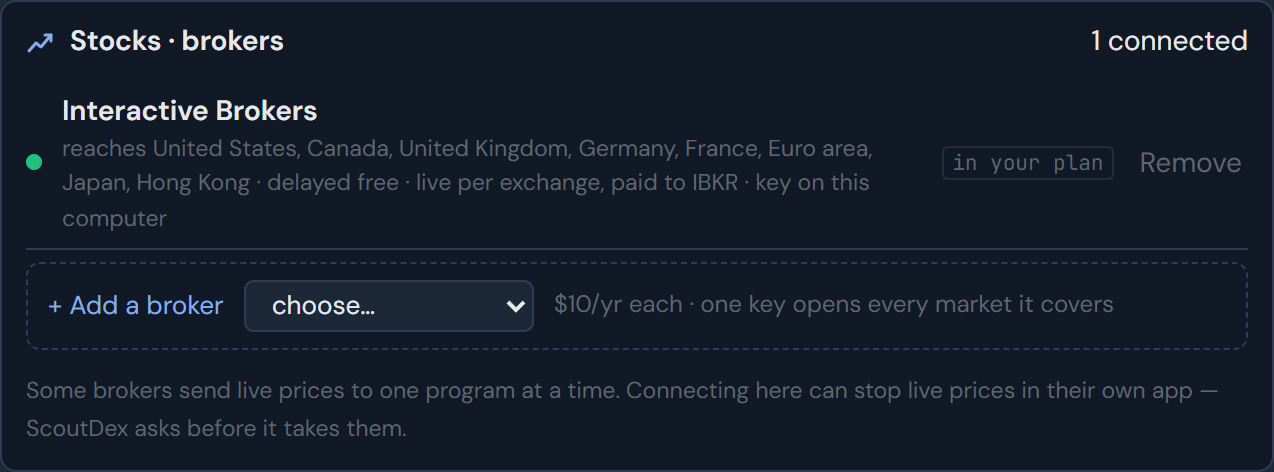
Stocks and brokers in Settings, Connections: one broker connected and an Add a broker slot
STUDIO · SETTINGS → CONNECTIONS · STOCKS · BROKERS

4. Connect and check what opened

Once your broker accepts it, the broker appears under Stocks · brokers with the countries it reaches and what live prices cost there. The key is then kept in Windows Credential Manager. It is never in a backup, a log or a deck you share, and we can’t see or recover it.

Some brokers send live prices to one program at a time. Connecting ScoutDex can stop live prices in the broker’s own app, so ScoutDex asks before it takes them.

One broker is included with Deck. Each further broker is $10 a year.
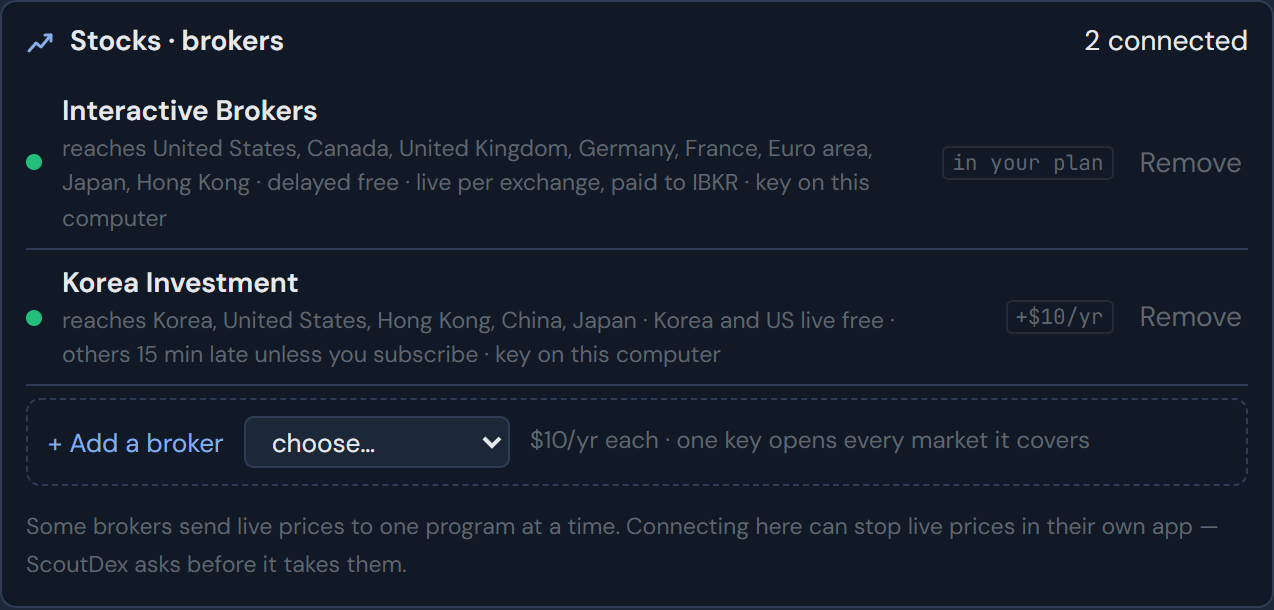
Two brokers connected, each with the countries it reaches
STUDIO · SETTINGS → CONNECTIONS · TWO BROKERS

5. Back in the studio

Return to the studio. The top of the components column shows the broker as connected, and in a stock component each country it reaches carries an API tag naming that broker.

On a second computer, paste the key again. It is never copied between devices.
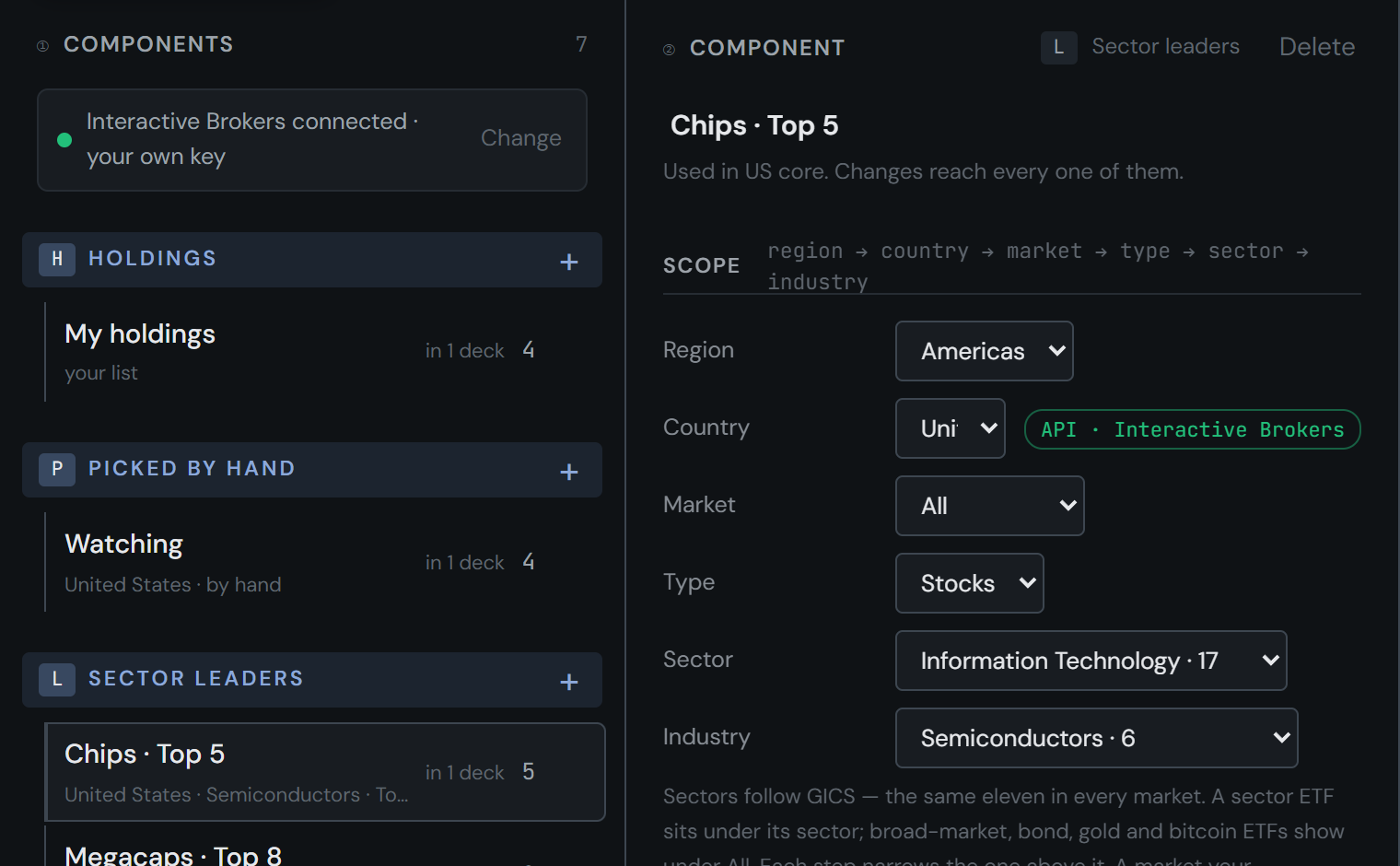
The components column showing the broker connected, and a component scope with an API tag beside the country
STUDIO · STOCKS · A COMPONENT

Connecting news

No key

News sources publish public feeds. Your computer reads them directly, so there is nothing to sign up for.

Why it’s done in the app

Browsers are blocked from reading most RSS feeds directly. The studio in the app reads them without that limit, so steps that read feeds run there. The studio in your browser hands over with Open in the ScoutDex app.

Choosing sources

  1. In the app, open the studio and start a news component.
  2. Pick a language and a country, then a topic. Markets & economy is the default; other topics come from feeds you add yourself.
  3. Tick the sources you want. Only those appear on the line.

News from public sources comes with Deck. A news service you already pay for counts as one more connection, at $10 a year.
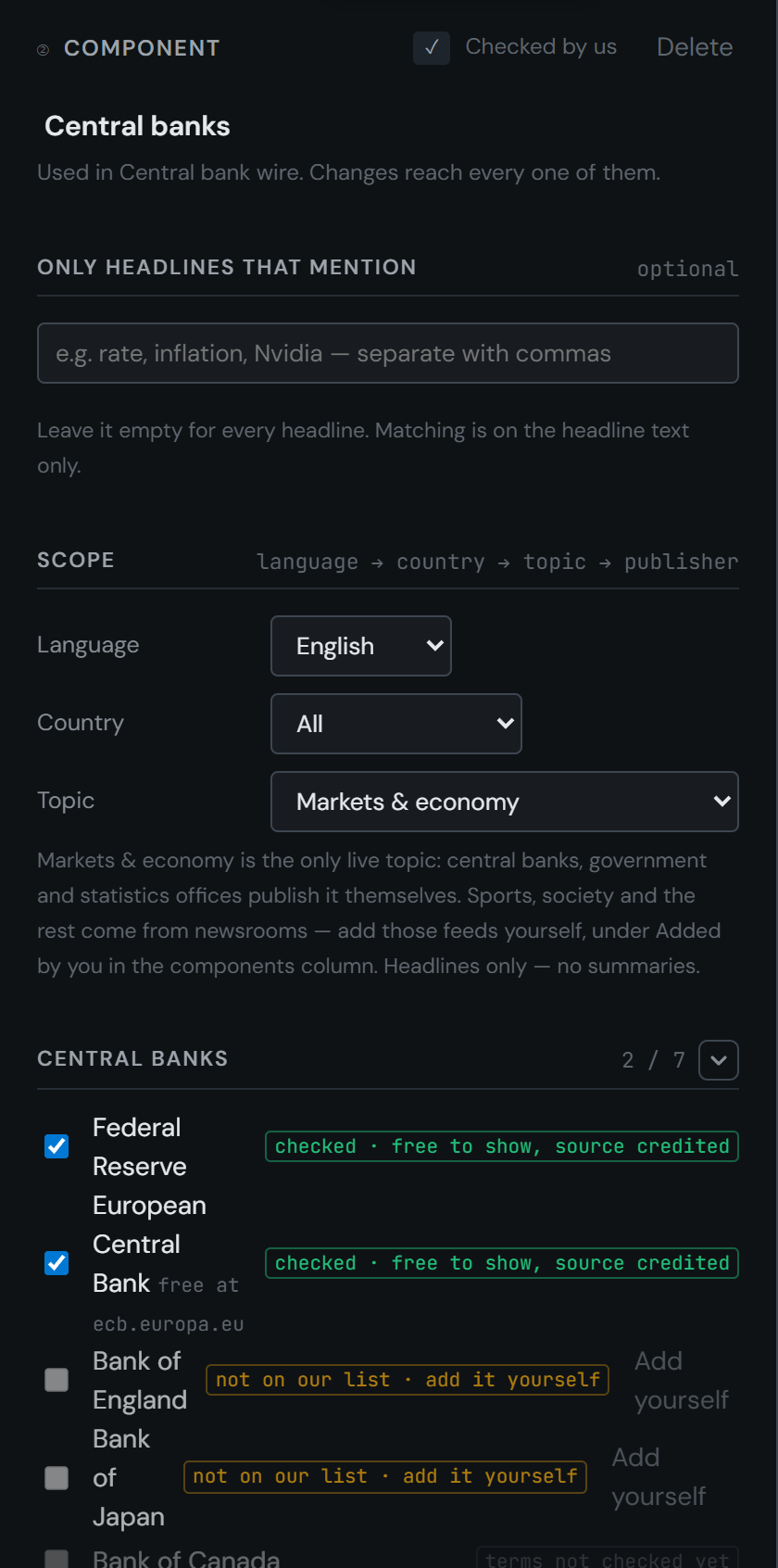
A news component: keyword filter, then language, country and topic
STUDIO · NEWS · A COMPONENT

By country

Where to get a stock key, and what crypto and news look like in each country. Works now means ScoutDex connects to that broker today. Planned means the broker issues keys to individuals and our connection isn’t built yet. Names are listed alphabetically, not ranked. Last checked 2026-10-10.

South Korea

Stocks — Korea Investment & Securities WORKS NOW

  1. Open a Korea Investment & Securities account. A mock-trading account also works.
  2. On the KIS website, go to Service application → Open API → KIS Developers, or use the API application button at the top right of the KIS Developers portal.
  3. Verify your identity with a certificate login and a mobile check.
  4. Choose the account to use and finish the application.
  5. Your App Key and App Secret appear in the application status table. Live and mock-trading accounts have separate keys.
  6. In ScoutDex, add the broker with the App Key, App Secret and account number, and choose Live or Mock trading to match the key.

The key opens Korean and US stocks with live prices, free. Hong Kong, China, Japan and Vietnam are 15-minute delayed unless you subscribe at KIS. ScoutDex renews the daily access token for you.

Stocks — Kiwoom Securities PLANNED
REST API, applied for at openapi.kiwoom.com. Requests are only accepted from IP addresses you register there.

Crypto — the KRW market is available without a key. Prices there often differ from the USDT market.

News — the Bank of Korea and Statistics Korea. Other feeds you add yourself, for your own use.

United States

Stocks — Alpaca WORKS NOW

  1. Sign up at alpaca.markets. A paper (practice) account gets keys without depositing money.
  2. Log in to the dashboard and choose Paper or Live in the top bar.
  3. In the API Keys panel, choose Generate New Key.
  4. Copy the API Key ID and the Secret Key. The secret is shown only once.
  5. In ScoutDex, add the broker with both values and choose Paper or Live to match.

Alpaca’s free plan gives live prices from one exchange (IEX). Prices from the whole US market are a paid Alpaca plan.

Stocks — Interactive Brokers WORKS NOW
Delayed prices are free; live prices are a per-exchange subscription paid to IBKR.

Stocks — Futu / moomoo WORKS NOW
US stocks.

Stocks — other brokers PLANNED
E*TRADE, Public.com, tastytrade, TradeStation, Tradier. Webull US can’t be used for display quotes.

Crypto — USD and USDT markets, without a key.

News — the Federal Reserve, BLS, BEA, the SEC and the Treasury. Other feeds you add yourself, for your own use.

Japan

Stocks WORKS NOW — through Interactive Brokers (delayed free, live paid to IBKR) or Korea Investment & Securities (15-minute delayed unless you subscribe).

Stocks PLANNED — Mitsubishi UFJ eSmart Securities (kabu Station API, through its desktop program).

News — none on our list. The Bank of Japan and other feeds you add yourself, for your own use.

India

Stocks — Upstox WORKS NOW
For Indian residents.

Stocks PLANNED — Angel One, Dhan, Kotak Neo. Some charge separately for market data through the API. Zerodha’s free plan can’t be used for display quotes.

News — none included yet. Feeds you add yourself work, for your own use.

Hong Kong

Stocks — Futu / moomoo WORKS NOW
Hong Kong live prices, free.

Stocks WORKS NOW — also through Interactive Brokers (delayed free, live paid to IBKR) and Korea Investment & Securities (delayed).

News — none on our list. The HKMA and other feeds you add yourself, for your own use.

Canada, United Kingdom, euro area

Stocks — Interactive Brokers WORKS NOW
Canada, the United Kingdom, Germany, France and other euro-area exchanges. Delayed prices are free; live prices are a per-exchange subscription paid to IBKR.

Stocks PLANNED — Questrade (Canada), Directa SIM (Italy).

News — the ONS (United Kingdom) and the ECB (euro area). The Bank of England and other feeds you add yourself, for your own use.

Taiwan

Stocks PLANNED — Fubon Securities.

News — the central bank of Taiwan.

Brokers that serve several regions

Interactive Brokers WORKS NOW — the US, Canada, the United Kingdom, Germany, France, the euro area, Japan and Hong Kong. Delayed prices are free; live prices are a per-exchange subscription paid to IBKR.

Futu / moomoo WORKS NOW — Hong Kong live, free; US.

PLANNED Capital.com, eToro, IG, Longbridge, Saxo, Tiger Brokers. One account can cover several markets. These also serve Singapore, the Netherlands, Spain, Switzerland and Australia, where local brokers rarely publish an API.

Webull US, Trading 212 and Zerodha’s free plan can’t be used for display quotes.

Market data services

WORKS NOW Finnhub, Twelve Data. For prices your broker doesn’t carry. Each uses its own key, entered under Settings → Connections, and is $10 a year.

Brazil

We found no broker that issues individual API keys for B3 prices. Crypto and news work as everywhere else.

Somewhere else

Tell us your broker and we will look at it. Write to us →

When it doesn’t work

The problems that come up most often, and what to do about each. The book icon opens the fuller answer in the docs. All of them in the docs →

The key is rejected

Check that the whole key and secret were copied, with no space at either end. Some brokers issue a separate key for a mock-trading or paper account; use the key issued for the account whose prices you want.

It worked yesterday and stopped today

Some brokers issue an access token that lasts a day. ScoutDex renews it, but if the renewal fails, open Settings → Connections and reconnect. Keys can also expire or be revoked at the broker; issue a new one there.

The broker asks for a registered IP address

Some brokers only accept requests from IP addresses you register on their API site. Register the public IP address of the computer running ScoutDex. If your internet provider changes it, register the new one.

Live prices stopped in your broker’s own app

Some brokers send live prices to one program at a time. Close one of the two, or use delayed prices in one of them.

Prices are missing, delayed or from one exchange only

Live quotes through the API can be a separate subscription at your broker, even if your trading app shows them. Check the market data your account is entitled to through the API.

Some symbols refresh slowly

Brokers limit how many requests a key can make per second. With a large deck, ScoutDex spaces requests to stay inside the limit.

An exchange isn’t in the crypto list

It doesn’t trade the settlement currency chosen in the component, or it isn’t ticked under Settings → Connections. Change the currency, or tick the exchange.

A news source shows nothing

The source may have stopped updating its feed or blocked automatic readers. ScoutDex checks the date of the latest headline and marks the source as quiet.

The studio says “Open in the ScoutDex app”

That step needs a key or an RSS feed, so it runs in the app. Install ScoutDex, and the button opens the same place there. Download →

Still stuck

Write to us with your broker’s name and what the app shows. Never send us your key or secret. Support →